AWS Multi-Account Strategy: How to Structure AWS as You Grow
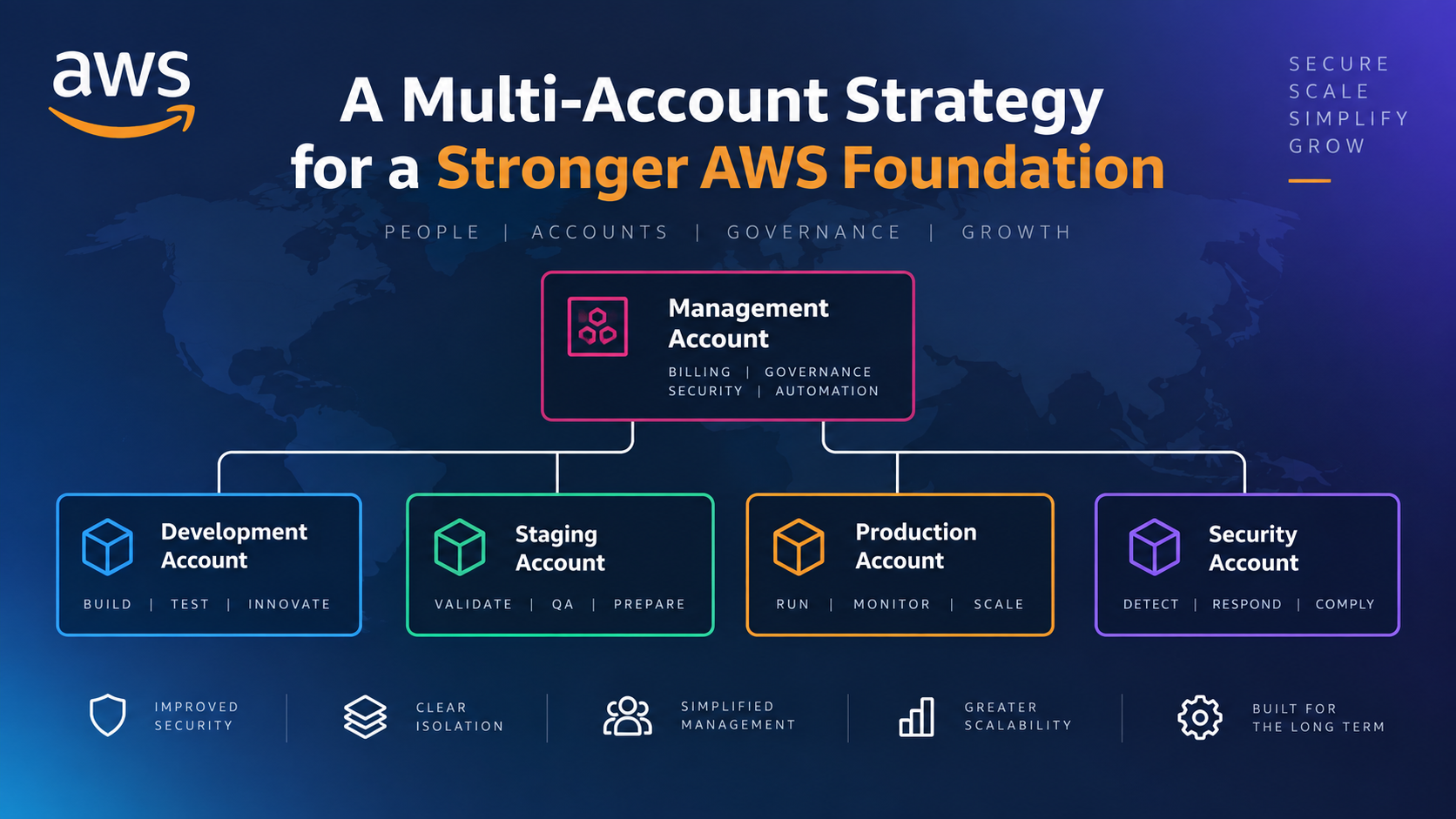
Many organisations begin using AWS with a single account.
At first, that makes sense. There may be one application, a small development team and only a handful of AWS resources to manage.
Then the environment grows.
Development and production begin sharing the same account. More engineers need access. Additional applications appear. Security requirements increase. AWS costs become harder to attribute, and IAM policies become increasingly difficult to manage without giving people more access than they need.
At that point, the simplicity of one AWS account can start creating its own complexity.
An AWS multi-account strategy defines how and why an organisation separates workloads, environments and responsibilities across AWS accounts as its cloud estate grows.
The objective is not to create as many accounts as possible.
It is to introduce deliberate boundaries for security, access, operations, governance and ownership.
Those decisions also form an important part of a wider AWS Landing Zone architecture, where account structure is combined with central identity, security, logging and governance.
What Is an AWS Multi-Account Strategy?
An AWS multi-account strategy is a planned approach to organising AWS workloads, environments and responsibilities across multiple AWS accounts.
Rather than placing every application, environment and team inside one account, the organisation decides where account boundaries provide useful separation.
Those boundaries might separate:
- production from non-production
- different applications or workloads
- security and audit functions
- central logging
- shared infrastructure
- experimental or sandbox workloads
- business units with different ownership or governance requirements
There is an important difference between having multiple AWS accounts and having a multi-account strategy.
An organisation might already have six AWS accounts because different engineers created them at different times. That does not necessarily mean it has a strategy.
A strategy answers questions such as:
- Why does each account exist?
- Who owns it?
- What workloads are allowed in it?
- Who can access it?
- Which security controls apply?
- Where are its logs collected?
- How are accounts grouped and governed?
- What happens when a new account is required?
- What happens when an account is no longer needed?
Why Use Multiple AWS Accounts?
AWS accounts provide stronger separation than simply organising resources into different VPCs, subnets, tags or IAM groups inside the same account.
AWS describes an account as an isolation boundary for identity and access management. Access between separate AWS accounts must be explicitly permitted.
That distinction is one of the main reasons account design becomes important as an AWS environment grows.
Isolation and blast radius
Consider an organisation running development and production inside one account.
A developer may need significant permissions to experiment in development. If the same identity and permission model also covers production resources, preventing accidental or unauthorised changes becomes more difficult.
Separating those environments into different accounts creates another boundary.
The same principle applies to security incidents and configuration mistakes. Account separation cannot prevent every incident, but it can reduce the number of unrelated resources exposed to the same permissions, changes or failures.
AWS discusses accounts as isolation boundaries in its Well-Architected guidance on AWS account management and separation.
Clearer permissions
A single large account can produce increasingly complicated IAM policies.
Different people may need different combinations of access to development, production, networking, security tooling, databases and particular applications.
With appropriate account boundaries, some of that complexity can instead be handled by deciding which accounts a user can access and what level of permission they receive within each one.
A developer might, for example, receive broad development permissions in a non-production account while having read-only or no access to production.
Account separation does not remove the need for good IAM design, but it gives the access model clearer boundaries.
Separate service quotas
Many AWS service quotas are applied at account level.
Separating workloads between accounts can therefore help prevent unrelated workloads from competing against the same account-level quotas.
This should not be the only reason for creating accounts, but it can become useful as AWS usage grows.
Clearer ownership and costs
Accounts also create useful cost and ownership boundaries.
If several workloads share one account, tags and other cost-allocation mechanisms become increasingly important for understanding who is responsible for particular spending.
With deliberate workload or environment accounts, the AWS account itself provides another level at which costs can be attributed.
Tags are still important. Multiple accounts do not remove the need for good cost management.
But it becomes easier to answer questions such as "How much is the production workload costing us?" when production resources are not mixed indiscriminately with development, experiments and unrelated applications.
When Should You Move Beyond a Single AWS Account?
There is no requirement to create a complex multi-account environment as soon as someone opens an AWS account.
For experimentation, training or a small proof of concept, one account may be perfectly adequate.
The question changes when AWS begins hosting systems that matter to the organisation.
Typical signs that it is time to consider an AWS multi-account strategy include:
| Trigger | Why Account Separation May Help |
|---|---|
| Production workloads are being introduced | Creates a stronger boundary around systems that affect customers or business operations. |
| Development and production share resources | Reduces the risk of development activity affecting production. |
| More engineers need AWS access | Makes access easier to separate according to responsibilities. |
| Multiple applications are being deployed | Creates clearer workload ownership and operational boundaries. |
| Sensitive data is being stored | Allows stronger isolation and more targeted security controls. |
| Security or compliance requirements are increasing | Supports clearer separation of duties, logging and governance. |
| AWS costs are difficult to attribute | Account-level spending provides another ownership boundary. |
| IAM policies are becoming complicated | Account access can become part of the permission model. |
| A significant AWS migration is planned | Provides an opportunity to establish the destination foundation before workloads arrive. |
| Central security monitoring is required | Dedicated security and logging responsibilities become more valuable. |
You do not need to wait until every trigger exists.
In practice, the introduction of important production workloads is a strong point at which to reconsider whether one shared account still provides the right boundary.
Retrofitting governance after dozens of workloads and teams have accumulated in one account is usually more complicated than making the important structural decisions earlier.
Should Development, Test and Production Use Separate AWS Accounts?
For environments containing meaningful production workloads, separating production from non-production is generally a strong design principle.
AWS's multi-account guidance recommends considering hard isolation between production and non-production by placing them in separate accounts.
Development environments change frequently. Engineers may require broader permissions. Experimental resources appear and disappear. New infrastructure and deployment processes need to be tested.
Production usually has a different risk profile.
It may contain customer data, revenue-generating applications or systems subject to stronger security and availability requirements.
Separate accounts make it possible to apply different:
- access permissions
- governance controls
- deployment rules
- monitoring expectations
- budgets
- security policies
There is a trade-off.
Separate accounts require you to think properly about cross-account deployment, networking, DNS, secrets, monitoring and access. A pipeline that previously deployed everything into one account may need to assume roles across accounts.
That extra work is not necessarily undesirable complexity. For a production environment, it is often the operational consequence of introducing a meaningful security boundary.
Not every development stage necessarily needs its own account, however.
A smaller organisation might initially use one non-production account and one production account. A larger platform might eventually separate development, testing, staging and production by workload.
The right decision depends on the risk and operational requirements rather than the number of environment names available.
AWS provides further guidance on evolving production and non-production environments in its multi-account implementation guidance.
What Should Be Separated Into Different AWS Accounts?
The useful question is not:
A better question is: Where do we need a meaningful security, operational, ownership or governance boundary?
Production and non-production
This is one of the most useful early boundaries.
Production generally deserves tighter access and change controls than environments used for development and experimentation.
Security responsibilities
Security tooling and administration may require independence from the teams operating everyday workloads.
As an AWS environment matures, dedicated security responsibilities can make it harder for a compromised workload administrator to interfere with the systems used to detect or investigate that compromise.
Central logging
Logs used for audit and investigation are particularly valuable when they are collected outside the accounts generating them.
This principle is reflected in AWS Control Tower, which establishes dedicated Audit and Log Archive accounts as part of its Landing Zone.
Workloads with different owners
Two applications may have completely different teams, deployment processes, data classifications and business owners.
Keeping them in separate accounts can give each workload a clearer operational boundary.
That does not mean every microservice requires an AWS account.
The account boundary should correspond to something meaningful.
Shared infrastructure
As environments grow, some organisations separate shared networking, DNS, deployment or other platform capabilities from application workloads.
Whether this is justified depends heavily on the operating model.
Sandboxes and experimentation
Experimentation has different requirements from production.
A sandbox account can give engineers room to explore AWS services while still allowing the organisation to apply limits around areas such as spending, Regions and access to production systems.
These are strategic principles rather than a complete account hierarchy.
AWS Organizations and Your Multi-Account Strategy
Once an organisation begins operating multiple AWS accounts, managing each one independently becomes increasingly inefficient.
AWS Organizations provides the central structure for managing accounts together.
An AWS Organization contains a management account and can contain member accounts, Organizational Units and organisation-level policies.
Organizational Units, or OUs, allow accounts with similar governance requirements to be grouped together.
For example, accounts might be grouped according to whether they host workloads, security capabilities, infrastructure or sandbox environments.
AWS advises against simply recreating the company's reporting hierarchy in OUs. Accounts should instead be grouped where they need similar policies and operational controls.
That distinction matters.
A company might reorganise departments every year. Its cloud security boundaries should not necessarily have to follow every change to the organisation chart.
AWS Organizations also supports central capabilities including policies, account management, integrations with AWS services and consolidated billing.
One account has a particularly important role: the management account.
AWS recommends tightly controlling access to it and not using it for normal business workloads.
The management account is there to administer the organisation, not to become another convenient place to deploy an application.
AWS provides more detail in its AWS Organizations management account best practices.
Where AWS Control Tower Fits
AWS Organizations gives you the underlying capabilities for managing a multi-account environment.
AWS Control Tower goes further by providing a managed way to establish and govern a multi-account AWS environment.
It orchestrates several AWS services and establishes important Landing Zone foundations, including security accounts and controls.
For organisations building a new AWS foundation, this can remove a significant amount of manual setup.
Before or alongside deploying it, you still need to decide:
- why accounts are being separated
- which workloads belong together
- how production will be isolated
- how users gain access
- which policies should apply
- how networking will operate
- who owns security
- where logs are stored
- how new accounts are requested and provisioned
- how exceptions are managed
Control Tower can implement and govern parts of the model.
It cannot decide the operating model for the business.
AWS explains the service's role in its AWS Control Tower multi-account Landing Zone guidance.
Identity Across Multiple AWS Accounts
Moving to multiple accounts should not mean creating a separate collection of long-lived IAM users in every account.
AWS IAM Identity Center can provide central workforce access across AWS accounts in an AWS Organization.
Users and groups can be assigned permission sets, which define the level of access they receive in particular AWS accounts.
For example, an engineering group might receive:
- broader permissions in development
- restricted deployment permissions in staging
- read-only or tightly controlled access in production
A security group can receive a different set of permissions appropriate to its responsibilities.
This produces a much more manageable model than manually maintaining unrelated workforce IAM users across every account.
AWS explains this model in its IAM Identity Center multi-account access guidance.
Security and Governance Across AWS Accounts
Account separation creates boundaries, but boundaries alone do not create governance.
A multi-account strategy needs consistent controls across those accounts.
Service Control Policies
AWS Organizations supports Service Control Policies, usually shortened to SCPs.
An SCP establishes limits on the permissions available to affected IAM users and roles in member accounts.
IAM policies and other applicable permission mechanisms still grant the actual permissions. SCPs establish boundaries around the maximum permissions that can be exercised.
This makes SCPs useful for organisation-wide guardrails, but they require careful design and testing.
A poorly planned SCP can disrupt legitimate workloads just as effectively as it can prevent an unwanted action.
AWS provides the authoritative behaviour and limitations in its Service Control Policies documentation.
Central logging and security visibility
A governed environment should also consider how activity and security information are collected across accounts.
Services commonly involved include:
- AWS CloudTrail
- AWS Config
- Amazon GuardDuty
- AWS Security Hub
The exact model depends on the environment, but the strategic principle is to avoid treating every AWS account as an independent security island.
Where appropriate, logging, configuration visibility and security findings should be available to the teams responsible for governance and investigation across the AWS estate.
In practical AWS Foundation Build work, this is why account structure, identity, logging and security controls need to be designed together.
Creating accounts first and asking how to govern them afterwards reverses the order of the important decisions.
Cost Management in a Multi-Account AWS Environment
Multiple AWS accounts do not require completely separate AWS bills.
AWS Organizations provides consolidated billing, allowing charges from member accounts to be brought together under the organisation.
At the same time, individual accounts create useful cost boundaries.
An organisation might be able to identify spending more clearly by:
- workload
- environment
- business owner
- platform function
But account separation is not a replacement for FinOps practices.
You may still need:
- cost-allocation tags
- AWS Budgets
- cost categories
- AWS Cost Explorer
- Savings Plans or Reserved Instance planning where appropriate
- ownership information
- showback or chargeback processes
The benefit is that the account becomes another useful dimension in the cost model.
A production account unexpectedly increasing from £2,000 to £4,000 per month is easier to investigate than a £2,000 increase buried inside an account containing production, development, test environments and unrelated experiments.
AWS explains how member-account charges are combined in its AWS Organizations consolidated billing documentation.
How Many AWS Accounts Do You Actually Need?
There is no universal number.
A company with three AWS accounts is not automatically less mature than one with thirty.
The appropriate number depends on factors including:
- number of workloads
- production and non-production requirements
- teams and ownership
- security requirements
- compliance obligations
- data sensitivity
- operating model
- rate of change
- need for experimentation
- degree of automation
A useful test is whether a proposed account creates a meaningful boundary.
Ask:
- Does this workload require different security controls?
- Does it have a different owner?
- Does it need to be isolated from production or other sensitive systems?
- Does it have substantially different access requirements?
- Does it need independent cost visibility?
- Does it have different compliance or data requirements?
- Would a problem here need to be contained from another workload?
Several strong "yes" answers may indicate that an account boundary is useful.
Creating an account simply because another account can be created is not a strategy.
A Practical AWS Multi-Account Growth Path
A multi-account environment does not have to appear fully formed on day one.
A growing organisation can introduce structure as its requirements become clearer.
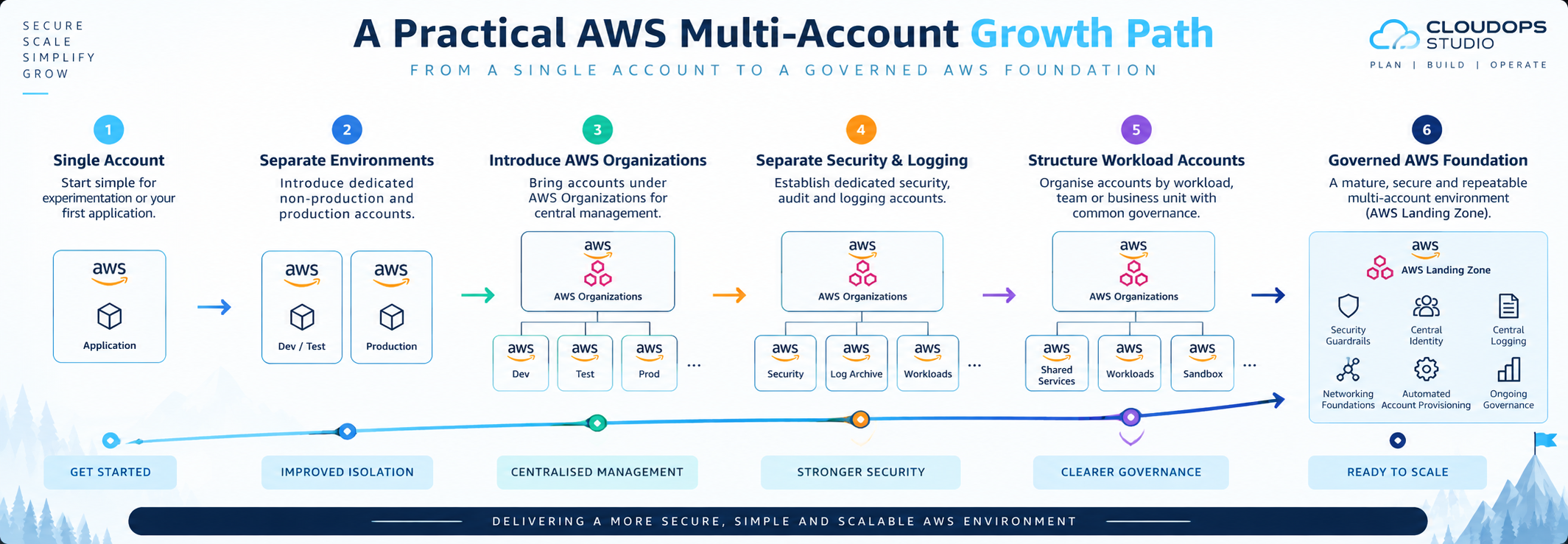
Stage 1: Single account
The organisation begins with AWS for experimentation, a proof of concept or its first application.
At this stage, keeping the environment simple may be reasonable.
The important consideration is recognising when the workload stops being experimental.
Stage 2: Separate production and non-production
The application becomes important to the business.
Production is moved behind a stronger account boundary, while development and testing continue separately.
Access can now differ substantially between the two environments.
Stage 3: Introduce AWS Organizations
Additional accounts appear.
Rather than administering them independently, the organisation brings them under AWS Organizations and begins establishing central ownership and governance.
Stage 4: Separate security and logging responsibilities
As security requirements increase, central audit, logging and security responsibilities are separated from everyday workload administration.
The organisation also starts thinking about organisation-wide security visibility rather than monitoring each account individually.
Stage 5: Structure workload accounts
Additional applications, teams or environments create new boundaries.
Accounts are grouped according to common governance requirements rather than being added randomly.
At this point, consistent naming, ownership, tagging and account lifecycle processes become increasingly important.
Stage 6: Establish a governed AWS foundation
Eventually, manually creating and configuring every account becomes inefficient.
The organisation needs repeatable:
- account provisioning
- identity
- logging
- security controls
- governance policies
- networking patterns
- operational standards
This is where a formal Landing Zone and services such as AWS Control Tower become increasingly relevant.
The precise path will differ between organisations.
The principle is to introduce governance before cloud growth makes governance significantly harder to retrofit.
Example: A SaaS Company Growing Beyond One AWS Account
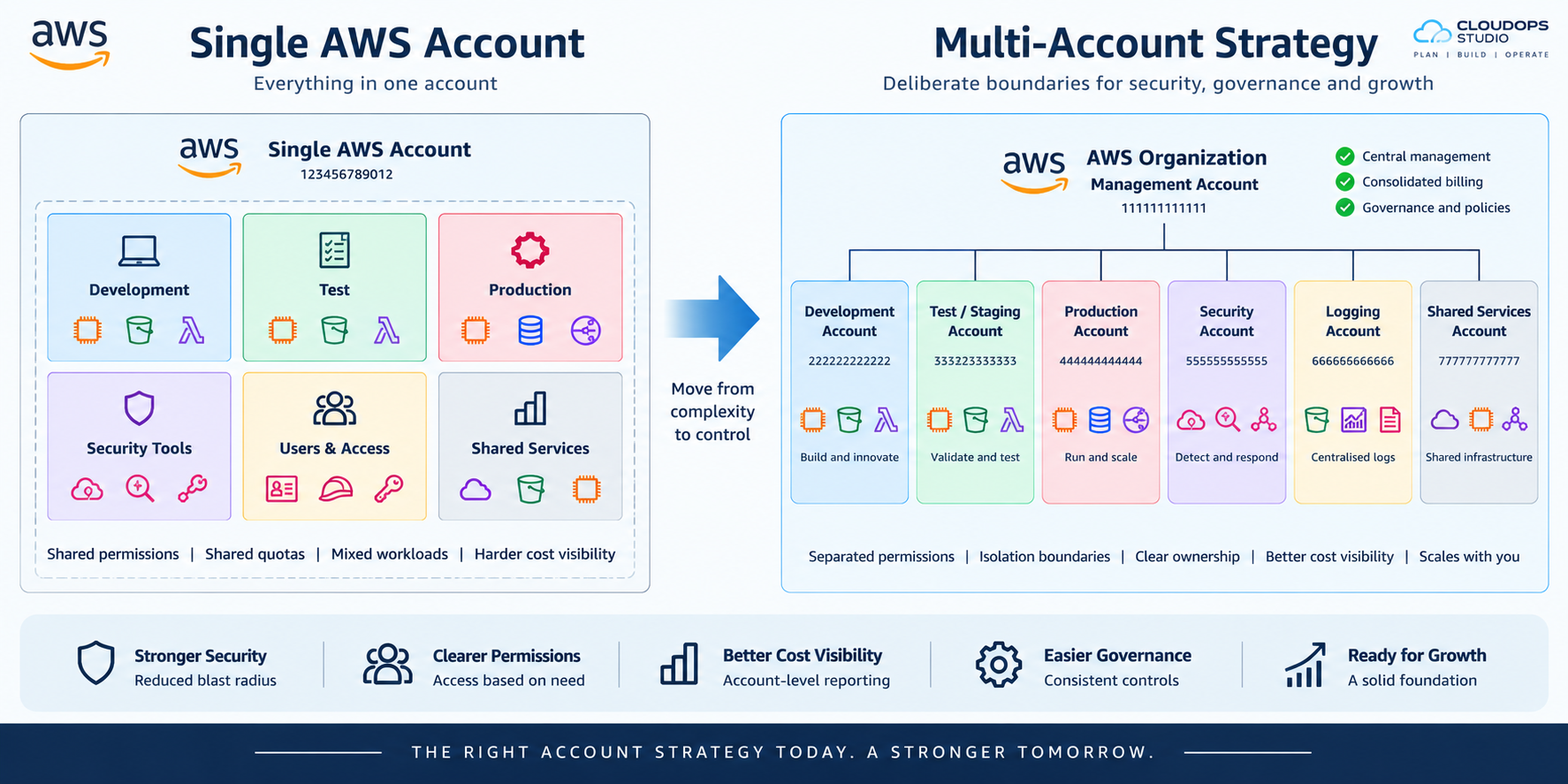
Consider a fictional SaaS company that originally launched its application from one AWS account.
The account now contains:
- production EC2 instances
- development resources
- production and test databases
- S3 buckets
- CloudWatch logs
- IAM access for several developers
- experimental Lambda functions
- shared networking
- customer-facing production resources
This worked when two engineers managed the platform.
Now the company has eight developers and is preparing to bring another product onto AWS.
Developers need freedom to work quickly, but giving everyone broad permissions inside the existing account also exposes production.
AWS costs have increased, but it is difficult to separate production spending from development and experiments.
The first strategic question should not be:
How many AWS accounts does a SaaS company need?
Instead, the team should identify the boundaries that matter.
Production needs stronger isolation.
Development needs greater freedom.
Security logs should not depend entirely on the same administrators operating the workloads.
The second application may eventually require its own ownership and deployment boundaries.
From those requirements, a multi-account model begins to emerge.
The company might first separate production and non-production, introduce AWS Organizations and centralise workforce access.
As the estate grows, dedicated security and logging responsibilities can be introduced, followed by clearer workload boundaries and automated account provisioning.
The result is not simply more AWS accounts.
It is a more deliberate operating model for AWS.
Common AWS Multi-Account Strategy Mistakes
1. Keeping everything in one account indefinitely
A single account can remain convenient long after it stops being an appropriate security and operational boundary.
The cost of restructuring also tends to increase as more workloads become dependent on the original account.
2. Creating dozens of accounts before they are needed
The opposite extreme is also a problem.
An elaborate account hierarchy built for hypothetical future requirements can add administration without providing immediate value.
Design for growth, but create boundaries for reasons you can explain.
3. Creating accounts without clear ownership
Every account should have a purpose and an owner.
Otherwise, organisations eventually accumulate accounts that nobody is confident about changing, closing or governing.
4. Running normal workloads in the Organizations management account
The management account has privileged responsibilities within AWS Organizations.
AWS recommends tightly controlling it and avoiding normal business workloads there.
Treat it as an administrative boundary, not spare hosting capacity.
5. Making OUs mirror the company organisation chart
OUs are primarily useful for grouping accounts that require similar governance policies.
The Finance department existing on an organisation chart does not automatically mean you need a Finance OU.
Start with governance requirements.
6. Creating separate IAM users everywhere
Multiple accounts should not create multiple identity silos for the same workforce.
Central workforce access using IAM Identity Center and appropriately designed permission sets can make access considerably easier to govern.
7. Having no central logging strategy
If each workload team controls all of its own audit information, investigations and security oversight become harder.
Logging responsibilities should be considered as part of the account strategy rather than added as an afterthought.
8. Deploying SCPs without understanding their impact
SCPs can establish powerful organisation-wide guardrails.
They can also prevent legitimate operations if introduced carelessly.
Policies should be designed, tested and introduced with an understanding of existing workloads.
9. Ignoring the account lifecycle
Creating an account is only the beginning.
A mature model also needs to consider:
- provisioning
- ownership
- baseline configuration
- access
- monitoring
- exceptions
- handover
- suspension
- eventual closure
10. Treating AWS Control Tower as the strategy
Deploying Control Tower does not decide which workload belongs in which account, who should have access or what the organisation's operating model should be.
Technology implements the strategy.
It does not replace it.
From Multi-Account Strategy to an AWS Landing Zone
A multi-account strategy answers some of the most important structural questions:
- What needs to be isolated?
- Which environments should be separated?
- Who should own each account?
- Which accounts need common governance?
- How should people gain access?
- Where should security and logging responsibilities sit?
As the AWS estate grows, another question appears:
That is where the discussion begins moving from multi-account strategy towards an AWS Landing Zone.
A Landing Zone brings the account model together with capabilities such as:
- AWS Organizations
- central identity
- security responsibilities
- central logging
- governance guardrails
- account provisioning
- networking foundations
- operational standards
If you want to see how those components fit together technically, our AWS Landing Zone architecture guide explains the broader multi-account design and governance model.
For organisations that are already outgrowing a single account, preparing for a significant AWS migration or trying to bring control to an existing collection of accounts, CloudOps Studio's AWS Foundation Build provides a structured route from discovery and account design through to identity, security, logging, governance, validation and operational handover.
AWS Multi-Account Strategy FAQs
What is an AWS multi-account strategy?
An AWS multi-account strategy is a planned approach to separating workloads, environments and responsibilities across AWS accounts. It defines where account boundaries are useful for security, access, governance, ownership, operations and cost visibility.
Why use multiple AWS accounts instead of multiple VPCs?
A VPC provides network isolation, while an AWS account provides a broader identity, resource and administrative boundary.
Separate accounts can therefore isolate permissions, resources, quotas and ownership in ways that creating additional VPCs inside the same account does not.
VPC and account boundaries solve different problems and are often used together.
Should production and development be in separate AWS accounts?
For meaningful production environments, separating production from non-production provides a stronger boundary between systems with different access, security and change requirements.
AWS's multi-account guidance recommends considering hard isolation between production and non-production environments.
Should every application have its own AWS account?
Not necessarily.
Separate accounts are useful where applications require meaningful differences in security, ownership, access, compliance or operational control.
Small or closely related workloads may not justify separate accounts.
The decision should be based on the boundary required rather than a rule that every application must receive an account.
How many AWS accounts should a company have?
There is no universal number.
The appropriate number depends on workloads, environments, security requirements, teams, ownership, compliance requirements and the organisation's operating model.
The objective should be sufficient isolation without creating unnecessary operational complexity.
What is the difference between AWS Organizations and AWS Control Tower?
AWS Organizations provides the underlying account hierarchy, Organizational Units, policies and central management capabilities for a multi-account AWS environment.
AWS Control Tower builds on AWS Organizations and other AWS services to provide a more prescriptive way to establish and govern a multi-account environment.
Do Service Control Policies give users permissions?
No.
SCPs establish limits on the permissions available to identities in affected AWS Organization member accounts. IAM policies and other applicable access policies still grant the actual permissions.
Does using multiple AWS accounts increase AWS costs?
AWS charges are generally based on the resources and services being used rather than simply on the existence of additional AWS accounts.
However, a governed multi-account environment may introduce additional usage of services for logging, monitoring, security and configuration management.
Those services and their expected usage should be considered when designing the environment.
Can existing AWS accounts be moved into a multi-account strategy?
Yes. Existing accounts can be brought into AWS Organizations and incorporated into a wider governance model, subject to the current configuration and requirements.
Existing environments should be assessed before restructuring them because workloads may already depend on IAM policies, networking, billing arrangements or other account-specific configuration.