AWS Migration Strategy: How to Choose the Right Approach (7 Rs)
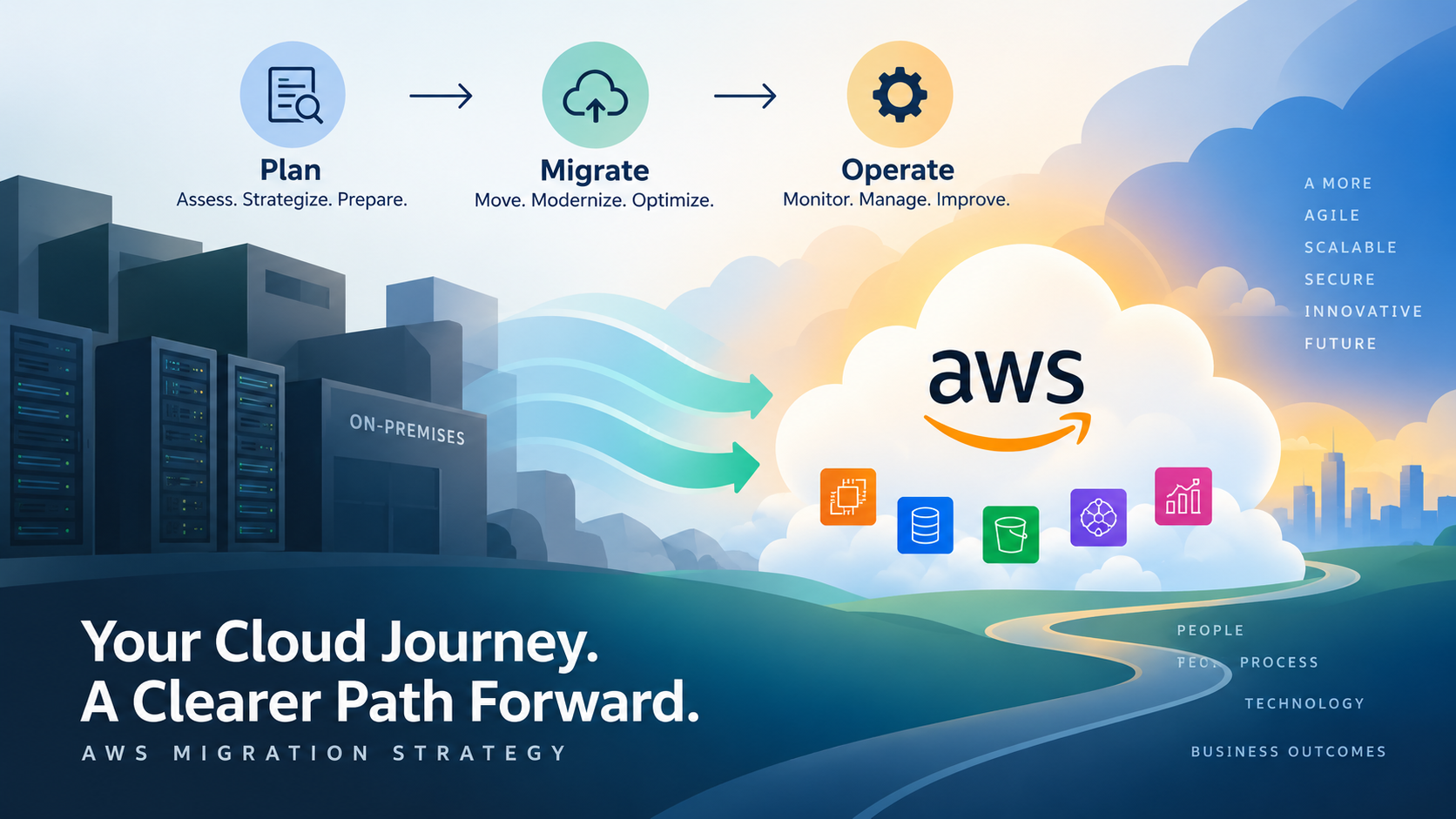
Choosing an AWS migration strategy is not about finding one migration method and applying it to every application.
Different workloads can require different approaches depending on why they are moving, how they are built, what they depend on, how much change the organisation is prepared to introduce and what the workload should look like after migration.
One application might need to move quickly with minimal changes. Another may benefit from selected AWS managed services. A third might justify significant architectural change, while another application may not need to migrate at all.
AWS groups these decisions into seven migration strategies commonly known as the 7 Rs: Retire, Retain, Rehost, Relocate, Repurchase, Replatform and Refactor or re-architect.
The important part is not memorising seven definitions. It is understanding which strategy makes sense for each workload and why.
Migration strategy is also only one part of the wider migration process. If you are still defining discovery, target architecture, migration waves, testing and cutover, our guide to creating an AWS migration plan explains how those decisions fit together.
This guide focuses specifically on the next question: how should each workload actually move to AWS?
What Is an AWS Migration Strategy?
An AWS migration strategy defines what should happen to an application or workload as part of a migration.
It describes the treatment applied to that workload rather than the complete migration programme.
For example, an application might be moved largely unchanged onto AWS infrastructure. Another application might move while replacing selected infrastructure components with managed AWS services. Another might be redesigned because its existing architecture no longer supports what the business needs.
AWS commonly describes seven migration strategies, known as the 7 Rs of migration.
These strategies provide a useful framework for deciding whether a workload should be moved, changed, replaced, retained or removed.
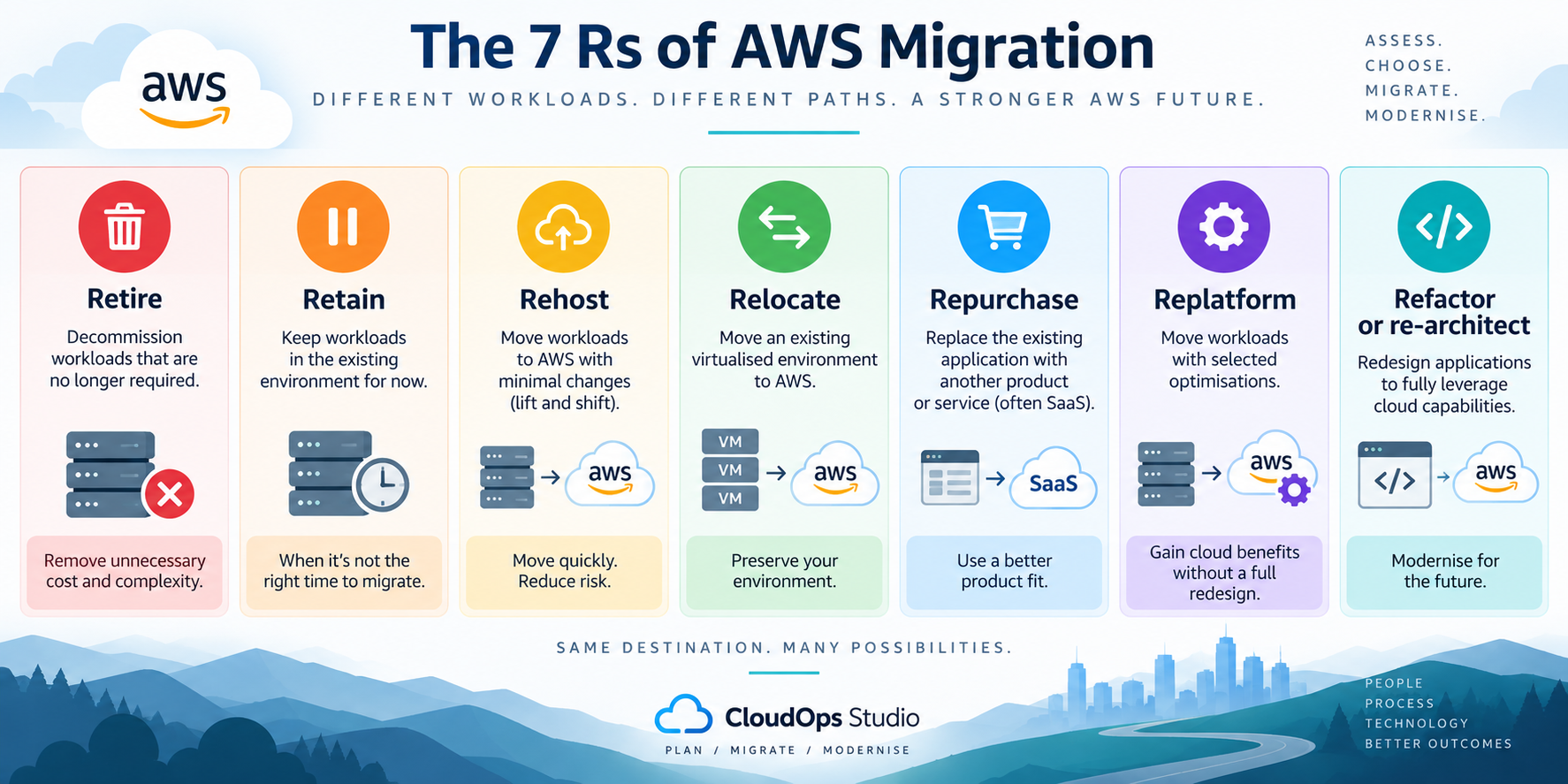
The AWS 7 Rs at a Glance
The seven strategies represent different outcomes for the workloads discovered during migration planning.
| Strategy | What happens? | Level of application change | Typical reason |
|---|---|---|---|
| Retire | The workload is decommissioned rather than migrated. | Not applicable | The application is no longer required or provides insufficient business value. |
| Retain | The workload remains in its existing environment for now. | None | Migration is not currently appropriate because of timing, dependencies, technical constraints or business requirements. |
| Rehost | The workload moves to AWS with minimal architectural change. | Low | The priority is often to move quickly or reduce change during migration. |
| Relocate | An existing virtualised environment is moved to AWS while preserving much of the existing operating model. | Low at application level | The organisation wants to move the existing environment without redesigning individual applications. |
| Repurchase | The existing application is replaced with another product or service. | Varies | A different product, often SaaS, better meets the organisation's requirements. |
| Replatform | The workload moves with selected platform or service improvements. | Moderate | The organisation wants useful cloud improvements without redesigning the entire application. |
| Refactor or re-architect | The application architecture is significantly changed. | High | The migration is also intended to address architectural limitations or enable significant modernisation. |
The amount of change shown here is a general distinction rather than a scoring system. Real migration effort depends on the application, its dependencies and the target architecture.
Understanding the 7 AWS Migration Strategies
Rehost: Move the Workload With Minimal Changes
Rehosting is commonly described as lift and shift.
The application moves to AWS without substantial changes to its architecture. Existing virtual machines might, for example, become Amazon EC2 instances while the application itself remains largely unchanged.
Rehosting can make sense when the main objective is to move workloads within a limited timeframe or when introducing application changes during the migration would create unnecessary risk.
Rehosting may be appropriate when:
- a data-centre or hosting contract has a fixed exit date
- the application already works reliably and does not require immediate redesign
- there is limited time or engineering capacity for application changes
- the organisation wants to separate migration from later modernisation
- dependencies make significant changes during migration undesirable
The limitation is that moving an application onto AWS infrastructure does not automatically make that application optimised for AWS.
Existing architectural limitations, inefficient resource sizing and operational processes can move with it.
Rehosting can therefore be a deliberate first stage rather than the final target state. Once the workload is stable in AWS, further optimisation or modernisation can be considered separately.
Replatform: Make Targeted Improvements During Migration
Replatforming sits between moving an application largely unchanged and redesigning it.
The core application architecture remains broadly recognisable, but selected infrastructure or platform components are changed to gain useful cloud benefits.
For example, an application might continue running on EC2 while a self-managed database is moved to an appropriate managed AWS database service.
That can reduce some operational responsibility without requiring the whole application to be rewritten.
Replatforming may make sense when:
- a specific managed AWS service can remove meaningful operational overhead
- the application does not justify a complete redesign
- selected changes can improve resilience, operations or maintainability
- the migration timetable allows controlled platform changes
- the team understands how the changed components will be operated after migration
The important question is whether the additional change produces enough benefit to justify introducing it during the migration.
Refactor or Re-architect: Redesign the Application
Refactoring or re-architecting involves more significant changes to the application and its architecture.
This approach may be considered when the existing architecture limits scalability, resilience, development speed, operational efficiency or other important business requirements.
The target architecture might make greater use of managed services, containers, event-driven components, serverless services or other AWS capabilities where they genuinely suit the application.
Refactoring can create substantial modernisation opportunities, but it also introduces more engineering work, testing and change than simply moving the existing application.
That distinction matters during a migration programme.
If the organisation has a fixed infrastructure exit deadline, attempting to redesign several applications while simultaneously moving them can increase programme complexity.
In some cases, rehosting or replatforming first and modernising after migration can provide a clearer separation between the migration objective and the modernisation objective.
Relocate: Move the Existing Environment
Relocation is different from rehosting individual applications.
It involves moving an existing virtualised environment to AWS while avoiding significant changes to individual workloads and their operating model.
This can be relevant where the organisation wants to move infrastructure while preserving an existing virtualisation environment rather than converting and redesigning workloads individually.
Relocation can reduce the amount of application-level change required during the move, but the target environment, networking, security, licensing and operating model still need to be assessed.
Repurchase: Replace the Existing Application
Sometimes the most sensible migration strategy is not to migrate the existing application at all.
Repurchasing means moving to a different product or service that provides the required capability. This commonly includes replacing an existing application with a SaaS platform.
The infrastructure migration may disappear, but the project does not necessarily become simple.
Repurchasing can still require decisions around:
- data migration
- user migration
- identity and access
- integrations
- business processes
- contractual commitments
- licensing
- training
- decommissioning the existing application
The comparison should therefore consider the overall business and technical impact, not simply whether buying another product appears easier than migrating the existing one.
Retain: Keep the Workload Where It Is
Not every workload needs to move immediately.
Retaining means deliberately leaving an application in its existing environment for now.
That might happen because the application has dependencies that cannot yet move, contractual or licensing constraints exist, a replacement is already planned, the migration risk currently outweighs the benefit or there is simply insufficient business justification to move it.
Retain should therefore be treated as a migration decision rather than automatically as a migration failure.
The important part is documenting why the workload is being retained and whether that decision should be reviewed later.
Retire: Don't Migrate What the Business No Longer Needs
Migration discovery often identifies applications, servers or infrastructure that no longer provide enough value to justify moving them.
They may support obsolete processes, duplicate functionality provided elsewhere, have no active users or simply remain online because nobody has formally decided to remove them.
Retiring these workloads avoids spending migration effort and future AWS operating cost on infrastructure the organisation no longer needs.
Retirement still needs to be controlled. Data-retention requirements, application dependencies, audit obligations and business ownership should be understood before anything is decommissioned.
Rehost vs Replatform vs Refactor: What's the Difference?
Rehost, replatform and refactor are often the strategies that create the most confusion because all three can result in an application continuing to operate in AWS.
The main difference is how much the workload changes as part of the move.
| Consideration | Rehost | Replatform | Refactor / Re-architect |
|---|---|---|---|
| Application change | Minimal | Targeted | Significant |
| Core architecture | Mostly retained | Largely retained | Redesigned where required |
| Engineering during migration | Generally lower | More involved | Potentially substantial |
| Cloud optimisation during migration | Limited | Selective | Potentially extensive |
| Typical driver | Move with limited change | Balance migration with selected improvements | Migration combined with significant modernisation |
These should not be treated as maturity levels where every workload should eventually reach refactoring.
A stable application with a limited remaining lifespan may have little business justification for extensive redesign. Rehosting it may be entirely appropriate.
Another application might create significant operational overhead because of one self-managed component. Replatforming that component could provide useful benefits without changing the entire application.
A strategically important product expected to evolve for many years may justify deeper architectural change if its existing design is preventing the organisation from meeting its objectives.
The decision therefore starts with the workload and the migration objective, not with a preference for a particular R.
How to Choose the Right AWS Migration Strategy
Selecting a strategy requires more than looking at the application's current server configuration.
The decision should consider the business purpose of the workload, its technical characteristics, dependencies, constraints and intended target state.
Start With the Business Reason for Migrating
The reason for migrating can immediately change which strategies are realistic.
An organisation leaving a data centre within six months has a different decision to one undertaking a multi-year application-modernisation programme.
Common drivers can include:
- data-centre or hosting exit
- hardware or software reaching end of support
- reducing infrastructure-management overhead
- improving resilience
- supporting application growth
- addressing architectural limitations
- changing licensing requirements
- modernising application delivery
- consolidating or retiring legacy systems
If the primary objective is a time-sensitive infrastructure exit, minimising application change may be valuable.
If the primary objective is to remove an architectural constraint, moving the same architecture unchanged may fail to address the reason for migrating.
Understand the Workload and Its Dependencies
Applications rarely operate in isolation.
A workload can depend on databases, authentication services, shared storage, other applications, internal APIs, network routes, third-party services and scheduled processes.
Those dependencies can restrict which migration strategies are practical and when the workload can move.
For example, changing a database platform during migration may appear attractive, but the application, drivers, stored procedures, reporting systems and integrations that use that database also need to support the change.
This is why migration strategy should follow sufficient discovery rather than being assigned from a server list alone.
Decide How Much Change You Can Introduce During Migration
Migration and modernisation do not always need to happen at the same time.
Combining them can be useful when a particular change directly supports the migration objective. It can also create additional engineering, testing and troubleshooting at exactly the point when the workload is changing environment.
Ask whether the proposed change needs to happen before, during or after migration.
If it can safely wait, separating the activities may reduce the number of variables involved in the migration itself.
Consider the Migration Timescale and Downtime Tolerance
Deadlines affect strategy.
A workload that must move before a fixed contract expiry may not have enough time for a major architectural redesign.
Downtime requirements can also affect how the migration is engineered, particularly where databases or frequently changing data are involved.
Strategy selection should therefore be realistic about the time available for development, testing, migration rehearsals and cutover.
Consider Technical Debt and Application Lifespan
Technical debt matters, but its existence does not automatically justify refactoring during migration.
Consider how strategically important the application is and how long the organisation expects to keep it.
Investing heavily in redesigning an application due to be replaced next year may provide little value. The same investment could make more sense for a core platform expected to support the business for many years.
Consider Licensing and Commercial Constraints
Software licensing can materially affect the target architecture.
Existing licences may have restrictions or different commercial implications when workloads move to cloud infrastructure. Support agreements and product versions may also affect what architectures are supported.
Licensing should therefore be investigated before committing to a migration strategy, particularly for commercial databases and enterprise applications.
Consider Security and Compliance Requirements
A target architecture must continue to meet the organisation's security and compliance obligations.
Consider data location, encryption, identity and access, logging, network controls, audit requirements and any application-specific regulatory obligations.
These requirements can affect both the migration approach and the AWS services suitable for the target environment.
Consider the Skills Needed After Migration
Architecture decisions create operational consequences.
Moving to a new platform or significantly redesigning an application can change how it is deployed, monitored, backed up, secured and supported.
Ask who will operate the workload after migration and whether the team has the skills, processes and tooling required for the proposed target architecture.
A technically attractive architecture that the organisation cannot reliably operate can introduce a different form of risk.
Define the Intended Target State
One of the most useful migration questions is not simply: "Can we move this application to AWS?"
It is: "What should this application look like after migration?"
If the intended target is essentially the existing application running on AWS infrastructure, rehosting may be appropriate.
If selected operational responsibilities should move to managed services, replatforming may better reflect the target.
If the existing architecture itself prevents the organisation from meeting important requirements, refactoring may need to be considered.
The target state should also fit within the wider AWS environment. For organisations building a governed multi-account foundation, our AWS Landing Zone service explains the account, identity, security, logging and governance foundation that can sit underneath migrated workloads.
A Practical AWS Migration Strategy Decision Framework
No simple flowchart can make every migration decision automatically.
Application architecture, business value, dependencies, risk and organisational constraints can make the decision considerably more nuanced.
However, the following questions provide a useful starting framework.
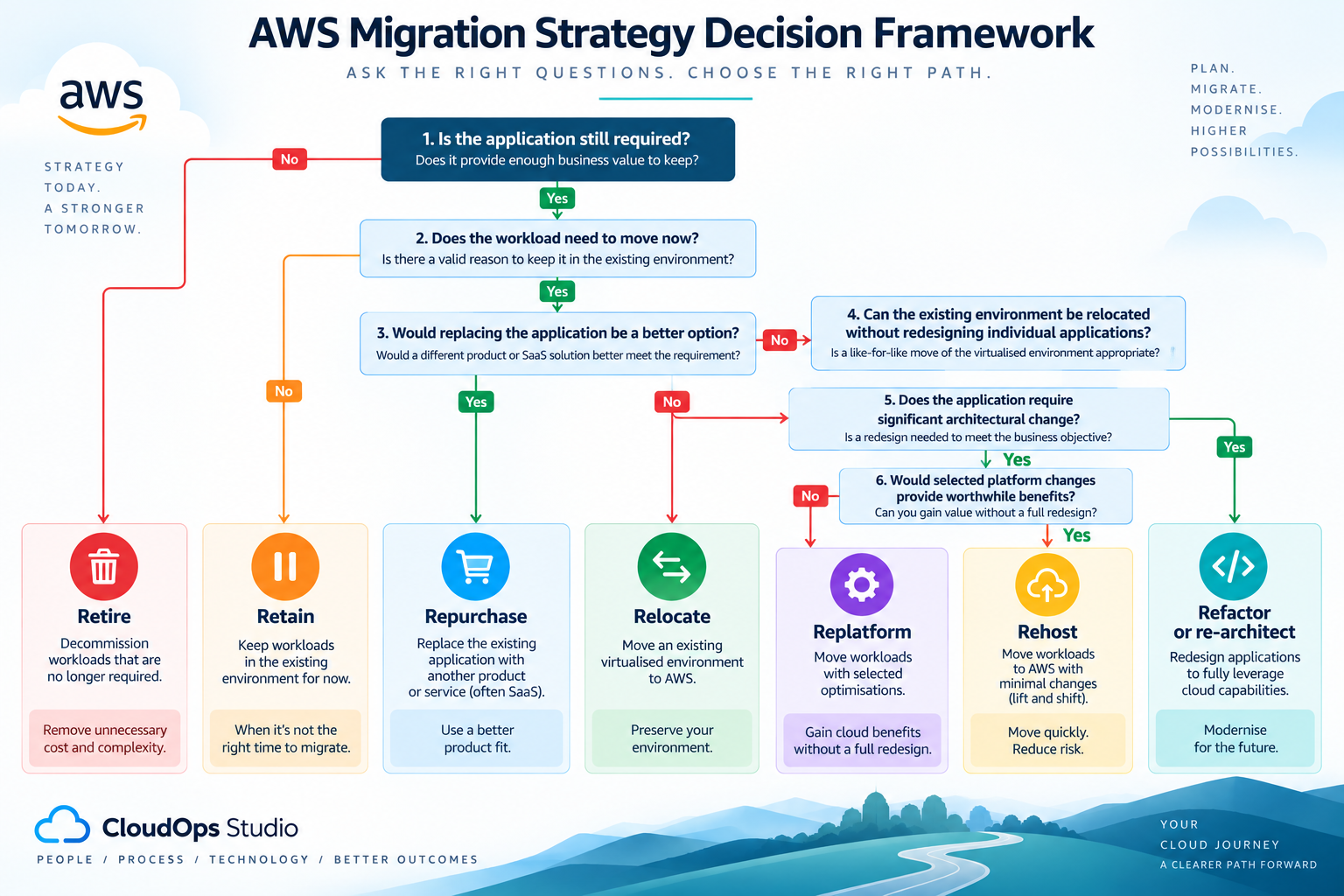
1. Is the application still required?
If it no longer provides sufficient business value and can be safely decommissioned, Retire may be appropriate.
2. Does the workload need to move now?
If there is a valid reason for leaving it in the existing environment, Retain may be the current strategy.
3. Would replacing the application make more sense than migrating it?
If another product or SaaS platform better meets the requirement, Repurchase may be considered.
4. Can the existing environment be relocated without redesigning individual applications?
Where the existing virtualisation platform and target environment support the approach, Relocate may be relevant.
5. Does the application require significant architectural change to achieve the migration objective?
If the existing architecture itself needs substantial redesign, Refactor or re-architect may be appropriate.
6. Would selected platform changes provide worthwhile benefits without redesigning the application?
If targeted changes can remove operational overhead or improve the target environment, Replatform may provide the right balance.
7. If none of those changes are required, can the workload move largely as it is?
Rehost may provide the most direct migration path.
One AWS Migration Programme Can Use Several Strategies
Consider a hypothetical organisation with several applications in an existing data centre.
There is no reason every application must receive the same migration treatment.
| Example workload | Possible strategy | Reason |
|---|---|---|
| Legacy reporting server with no active business users | Retire | Avoid migrating and operating infrastructure that is no longer required. |
| Specialist application tied to hardware that cannot currently move | Retain | Keep it in the existing environment until the constraint changes. |
| Stable internal application facing a fixed data-centre exit | Rehost | Move with limited application change and consider optimisation afterwards. |
| Application using a self-managed database | Replatform | Move the application while considering an appropriate managed database service. |
| Business system being replaced by a SaaS product | Repurchase | Move users, processes and required data to the replacement rather than migrating the existing application. |
| Strategic application constrained by its existing architecture | Refactor / Re-architect | Redesign where the expected business value justifies the additional engineering. |
| Suitable existing virtualised environment | Relocate | Move the environment while minimising changes to individual workloads. |
These examples are illustrative rather than recommendations for every workload of that type.
What matters is that each decision has a documented reason.
That also makes later migration planning easier because the strategy begins to reveal the engineering effort, target architecture, testing requirements and migration dependencies associated with each workload.
Turn Migration Strategy Decisions Into a Migration Plan
Selecting the migration strategy does not complete the migration plan.
It gives the plan an important workload-level input.
Once the strategy has been agreed, the team can define the target architecture, migration method, technical prerequisites, testing requirements and sequencing in more detail.
Strategy can also influence migration waves.
A group of straightforward rehost workloads may require a very different delivery process from an application undergoing significant re-architecture.
Dependencies still matter as well. Two applications with different migration strategies may need to move together because they rely on each other.
If you need the wider process around discovery, assessment, target architecture, wave planning, cutover and validation, see the full AWS migration planning guide.
Build a Starting AWS Migration Approach
If you're still working out how a workload could move to AWS, CloudOps Studio's free AWS Migration Path Builder can help turn the initial requirements into a more structured starting point.
Provide information about the current workload and migration requirements and the tool generates an initial migration approach covering areas such as proposed AWS architecture, migration steps, risks and indicative costs.
It is not a substitute for detailed discovery and engineering in a complex production environment.
It is designed to help you move from "we want to migrate this workload" towards a practical approach that can be reviewed and developed further.
When Should You Get Help Choosing an AWS Migration Strategy?
Some strategy decisions are straightforward.
Others require deeper application discovery and architecture work before a sensible decision can be made.
Specialist migration support may be useful when:
- several applications have complex or undocumented dependencies
- the migration involves business-critical workloads
- there is a fixed infrastructure-exit deadline
- downtime needs to be minimised
- the target AWS architecture is unclear
- the organisation is deciding between migration and modernisation
- licensing or technical constraints affect the available options
- the AWS foundation needs to be designed alongside the migration
- internal AWS migration experience is limited
The useful time to resolve those questions is during assessment and planning, before migration dates and architectures become difficult to change.
CloudOps Studio's AWS Migration Services can help organisations assess workloads, choose appropriate migration strategies, design the target AWS environment and plan and deliver the migration.
AWS Migration Strategy FAQs
What are the 7 Rs of AWS migration?
The seven AWS migration strategies are Retire, Retain, Rehost, Relocate, Repurchase, Replatform and Refactor or re-architect.
They describe different treatments for applications and workloads during migration. Different workloads within the same migration programme can use different strategies.
What is the difference between rehost and replatform?
Rehosting moves a workload with minimal architectural change. Replatforming introduces selected changes to the platform or infrastructure while keeping the application's core architecture broadly intact.
For example, moving an application largely unchanged onto EC2 could be a rehost, while moving the application and replacing a self-managed database with an appropriate managed AWS database could form part of a replatform.
What is the difference between replatform and refactor?
Replatforming makes targeted changes without fundamentally redesigning the application's core architecture.
Refactoring or re-architecting involves more substantial architectural change and may require considerably more development and testing.
The appropriate choice depends on the workload, the migration objective and whether significant modernisation needs to happen as part of the migration.
Is rehosting always less effective than refactoring?
No.
Rehosting and refactoring solve different migration problems.
Rehosting can be appropriate when speed, limited application change or separation of migration from later modernisation is important. Refactoring may be appropriate when significant architectural change is required and the expected benefits justify the additional engineering.
The strategy should be selected against the workload and business objective rather than assuming the option involving the most change is automatically better.
Can different applications use different AWS migration strategies?
Yes.
Migration strategy should normally be considered at application or workload level.
The same migration programme might rehost one application, replatform another, retire obsolete infrastructure, retain a constrained workload and refactor a strategically important application.
Should applications be modernised during or after migration?
It depends on the migration objective, available time, engineering capacity and the application itself.
Some selected changes may provide enough benefit to justify replatforming during migration. More substantial modernisation can introduce additional engineering and testing, so in some programmes it may be preferable to move the workload first and modernise it afterwards.
Choose the Strategy for the Workload, Not the Estate
The AWS 7 Rs provide a useful framework, but the value comes from applying them to real workloads rather than treating them as seven definitions to memorise.
Start by understanding why the organisation is migrating.
Then assess what the application does, what it depends on, how critical it is, what constraints apply and what the target state should achieve.
Some workloads may need to move quickly with minimal change. Others may justify selected platform improvements. Some may require significant redesign. And some should be retained, replaced or retired rather than migrated.
The result should be a documented strategy for each workload that can feed into architecture, migration sequencing, testing and cutover planning.
If you're still determining the right migration approach, start with the free AWS Migration Path Builder .
If you need help assessing workloads, selecting migration strategies or planning and delivering the move to AWS, explore CloudOps Studio's AWS Migration Services .